Wichtig
Übersetzen ist eine Gemeinschaftsleistung Sie können mitmachen. Diese Seite ist aktuell zu 39.29% übersetzt.
21.1. Authentifizierungssystem Übersicht
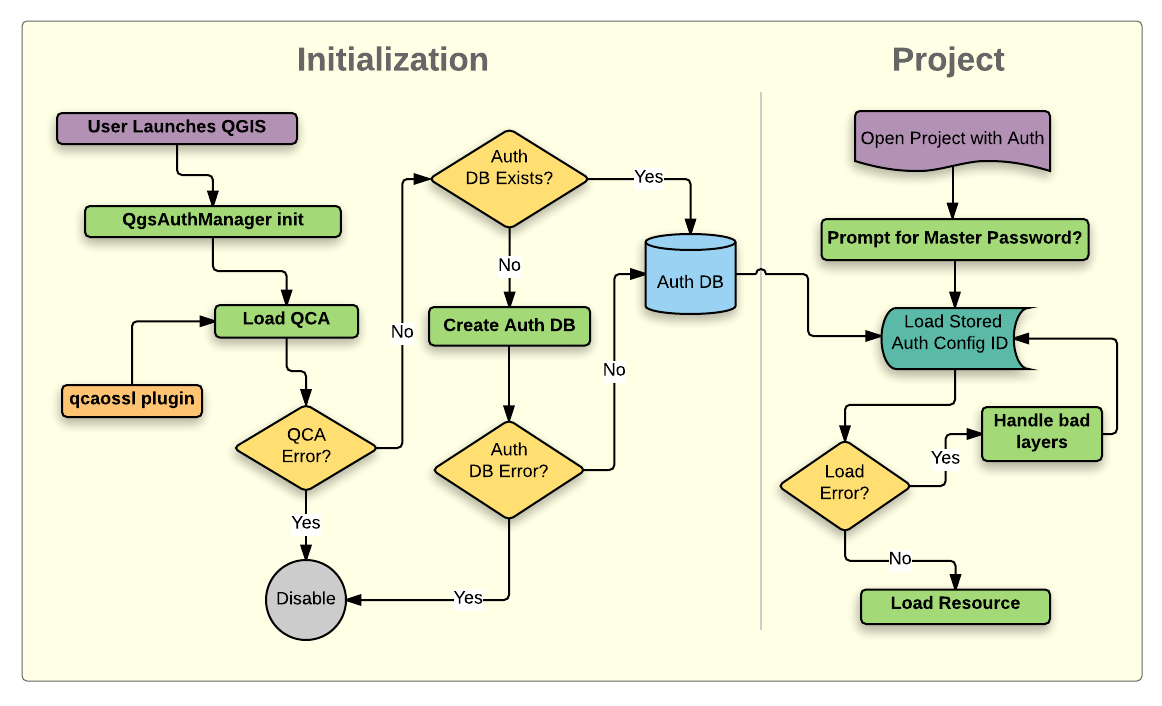
Abb. 21.1 Anatomie des Authentifizierungssystems
21.1.1. Authentifikationsdatenbank
The authentication system stores authentication configurations in an
SQLite database file located, by default, at <profile directory>/qgis-auth.db.
Diese Authentifizierungsdatenbank kann ohne Auswirkung auf andere aktuelle QGIS Benutzereinstellungen zwischen QGIS Installationen bewegt werden, da sie völlig unabhängig von normalen QGIS-Einstellungen ist. Eine Konfigurations-ID (eine zufällige 7-stellige alphanumerische Zeichenfolge) wird erzeugt, wenn eine Konfiguration zu der Datenbank gespeichert wird. Dies stellt die Konfiguration dar, wodurch die ID im Klartext als Anwendungskomponenten gespeichert wird (z. B. Projekt-, Plugin- oder Einstellungsdateien) ohne Offenlegung ihrer zugehörigen Anmeldeinformationen.
Bemerkung
Das übergeordnete Verzeichnis des qgis-auth.db`kann mit der folgenden Umgebungsvariablen gesetzt werden, ``QGIS_AUTH_DB_DIR_PATH`, oder mit der --authdbdirectory Option während des Starts auf der Kommandozeile.
21.1.2. Custom authentication databases
QGIS can be configured to use a custom authentication database instead of the above mentioned default SQLite one: any database supported by the Qt SQL module can be used (e.g. PostgreSQL, MySQL, etc), provided that the corresponding Qt SQL driver is available in the system.
This can be useful in scenarios where a user wants to share the same authentication database between multiple QGIS installations, or when a user wants to use a different authentication database than the default SQLite one or when a centralized authentication database is used by QGIS server.
The only way to configure a custom authentication database is by setting the
QGIS_AUTH_DB_URI environment variable to the URI of the connection, the URI
is in the form of driver://username:password@hostname:port/database?options.
- Where:
driveris the name of the Qt SQL driver to use, e.g.QPSQLfor PostgreSQL,QMYSQLfor MySQL, etc.usernameis the username to use to connect to the databasepasswordis the password to use to connect to the databasehostnameis the hostname of the database serverportis the port of the database serverdatabaseis the name of the database to useoptionsare the options to pass to the driver, e.g.sslmode=requirefor PostgreSQL
Bemerkung
The schema can be specified in the URI options, e.g. QPSQL://username:password@hostname:port/database?schema=schema_name
The database must exist before starting QGIS, and the user must have the necessary permissions to connect to the database and to create the required tables if they do not exist.
Warnung
The password in the URI is stored in plain text in the environment variable, so it is recommended to use a passwordless user or a user with limited permissions to connect to the database.
Warnung
Any database not based on SQLite is considered to be read-only (this can be changed by Python plugins if necessary).
This is an advanced feature, designed to allow one or more custom authentication databases or even custom Python implementations of credentials storages to be used by QGIS.
The system is also designed to allow for multiple authentication databases to be used but there is currently no user facing interface to manage multiple credential storages so its usage requires manual configuration and management, typically from a Python plugin.
21.1.3. Hauptpasswort
Um vertrauliche Informationen in der Datenbank zu speichern oder darauf zuzugreifen, muss ein Master Passwort eingerichtet werden. Ein neues Master-Passwort wird angefordert und verifiziert, wenn erstmals irgendwelche verschlüsselten Daten in der Datenbank gespeichert werden. Wenn auf sensible Informationen zugegriffen wird, wird der Benutzer zur Eingabe des Master-Kennworts aufgefordert. Das Passwort wird dann für den Rest der Sitzung zwischengespeichert (bis die Anwendung beendet wird), es sei denn, der Benutzer wählt manuell eine Aktion aus, um den zwischengespeicherten Wert zu löschen. Bei einigen Vorgängen ist es nich nötig, das Master-Passworts einzugeben - z. B. bei der Auswahl einer vorhandenen Authentifizierungskonfiguration oder beim Anwenden einer Konfiguration auf eine Serverkonfiguration (wie z. B. beim Hinzufügen eines WMS-Layers).
Sie können das Passwort in dem Wallet/Keyring Ihres Computer speichern.
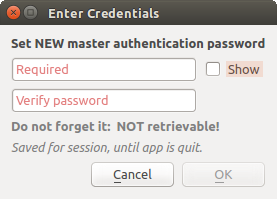
Abb. 21.2 Neues Hauptpasswort eingeben
Bemerkung
Ein Pfad zu einer Datei, die das Hauptpasswort beinhalet, kann mit Hilfe der Umgebungsvariablen eingestellt werden QGIS_AUTH_PASSWORD_FILE.
21.1.3.1. Hauptpasswort verwalten
Einmal eingestellt, kann das Hauptpasswort zurückgesetzt werden, das aktuelle Hauptpasswort wird vor dem Zurücksetzen jedoch benötigt werden. Während dieses Prozesses ist es eine Option, eine vollständige Sicherung der aktuellen Datenbank vorzunehmen.
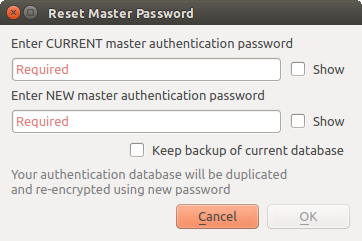
Abb. 21.3 Hauptpasswort zurücksetzen
Wenn der Benutzer das Hauptpasswort vergisst, gibt es keine Möglichkeit es abzurufen oder außer Kraft setzen. Es gibt auch keine Mittel die verschlüsselten Informationen abzurufen ohne das Master-Passwort zu kennen.
Wenn ein Benutzer das bestehende Password drei Mal falsch eingibt, wird ein Dialog Ihnen anbieten, die Datenbank zu löschen.
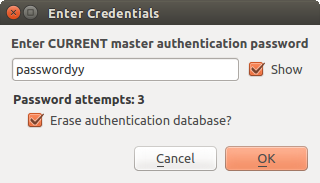
Abb. 21.4 Passwortabfrage nach drei ungültigen Versuchen
21.1.4. Authentifikationskonfiguration
Sie können Authentifizierungseinstellungen über Konfigurationen in dem Authentifizierung Reiter des QGIS Optionen Dialog () vornehmen.
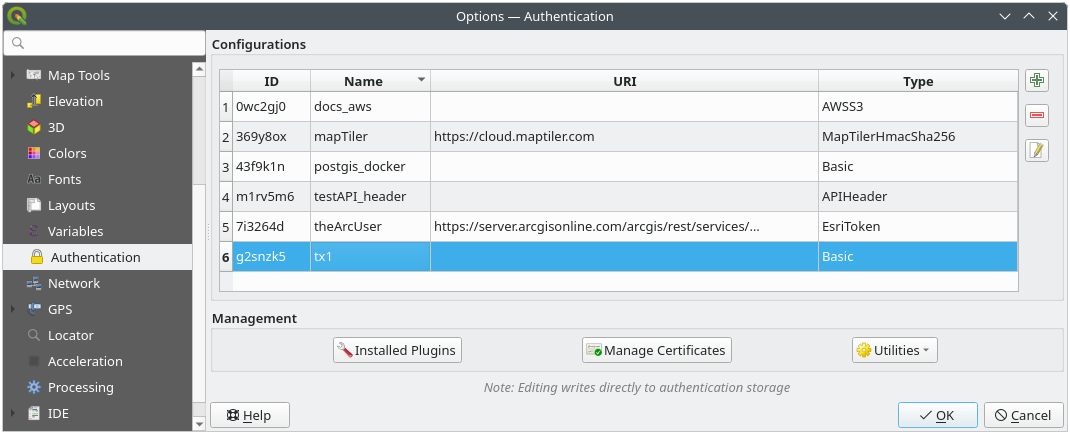
Abb. 21.5 Konfigurationen Editor
To create a new authentication configuration:
Press the
 Add a new authentication configuration
Provide a Name and optional Resource URL
A seven-characters ID will be assigned to the configuration for identification purpose. It can be customized after you pressed the
 Unlock to edit ID button.
Be aware that updating that ID may break things.
Unlock to edit ID button.
Be aware that updating that ID may break things.Select the target method and fill the corresponding connection details
Once done, click Save to save the configuration. The saved configuration appears in the list of authentication configurations and can be used with supported connections.
The saved configuration can later be edited using  Edit selected configuration
or removed using
Edit selected configuration
or removed using  Delete selected configuration.
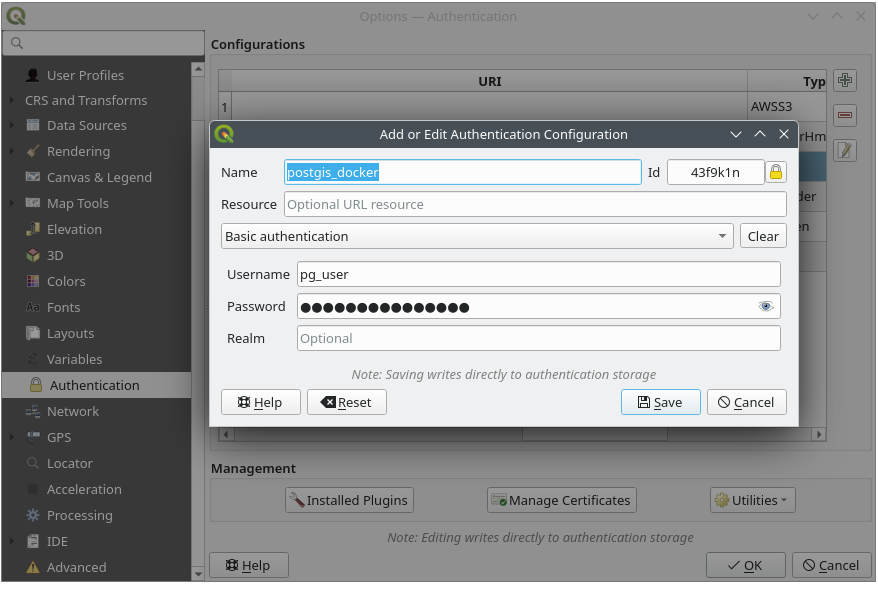
Abb. 21.6 Konfigurationen von innerhalb des Konfigurationseditors hinzufügen
The same type of operations for authentication configuration management (Add, Edit and Remove) can be done when configuring a given service connection, such as configuring an OWS service connection. For that, there are action buttons within the configuration selector for fully managing configurations found within the authentication database. In this case, there is no need to go to the configurations in Authentication tab of QGIS options unless you need to do more comprehensive configuration management.
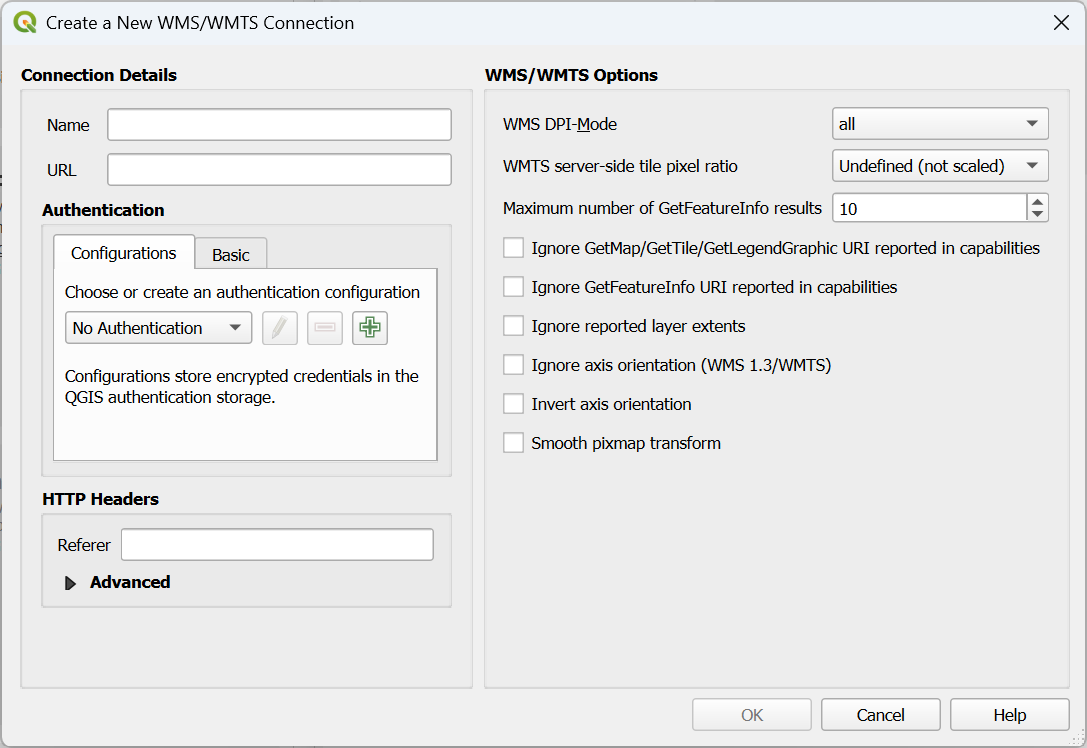
Abb. 21.7 WMS connection dialog showing authentication configuration widget
Beim erstellen oder bearbeiten einer Authentifikationskonfiguration, ist ein Name, eine Authentifizierungsmethode oder eine andere Information, die die Authentifizierungsmethode benötigt, erforderlich (mehr über die verfügbaren Authentifikationstypen in Authentifizierungsmethoden).
21.1.5. Authentifizierungsmethoden
Verfügbare Authentifizierungen werden von C++-Plugins auf die gleiche Weise bereitgestellt wie Daten Provider-Plugins von QGIS unterstützt werden. Die Authentifizierungsmethode, die ausgewählt werden kann, ist relativ zu dem Zugriff, der für die Ressource/den Anbieter benötigt wird, z. HTTP(S) oder Datenbank, und ob es Unterstützung sowohl im QGIS-Code als auch in einem Plugin gibt. Daher sind einige Plugins für Authentifizierungsmethoden möglicherweise nicht überall dort, wo ein Auswahlschalter für die Authentifizierungskonfiguration angezeigt wird, anwendbar. Eine Liste von verfügbaren Plugins für Authentifizierungsmethoden und deren kompatible Ressourcen/Anbieter kann aufgerufen werden, indem Sie zu navigieren und in der Registerkarte Authentifizierung auf die Schaltfläche  Installierte Plugins klicken.
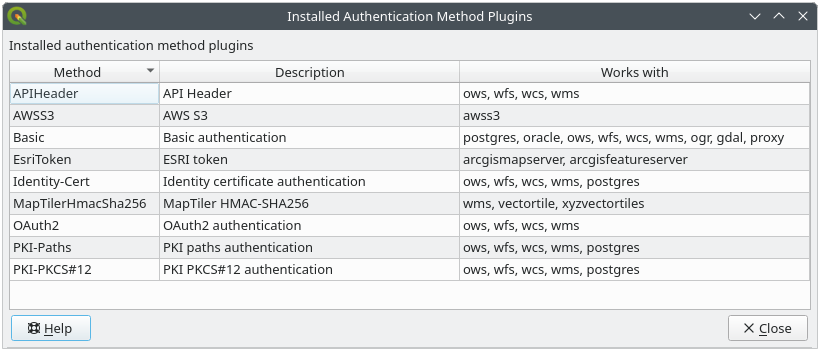
Abb. 21.8 Verfügbare Liste von Methodenerweiterungen
Plugins für neue Authentifizierungsmethoden können erstellt werden, wenn QGIS dadurch nicht neu kompiliert werden muss. Da die Unterstützung für Plugins derzeit nur C++ ist, muss QGIS neu gestartet werden, damit das neue Dropped-In-Plugin dem Benutzer zur Verfügung steht. Stellen Sie sicher, dass Ihr Plugin für dieselbe Ziel-Version von QGIS kompiliert wird, zu der es hinzugefügt werden soll.
21.1.5.1. API Header Authentication
The API Header authentication method allows you to connect to services
that require custom HTTP headers, such as API keys.
For example, if a WMS service requires an API key sent as a header
(e.g. X-API-KEY), you can use this method to provide it.
You can add one or more headers with the button; provide a
Header Name and Header Value for each entry. Use
to delete the selected header or the Clear
button to remove all entries.
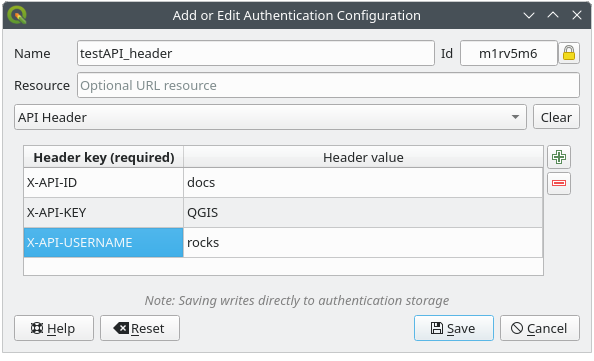
Abb. 21.9 API Header authentication configs
21.1.5.2. AWS S3 Authentication
The AWS S3 authentication method allows you to connect to Amazon S3 resources by providing a Name, Resource, Username, Password, and Region.
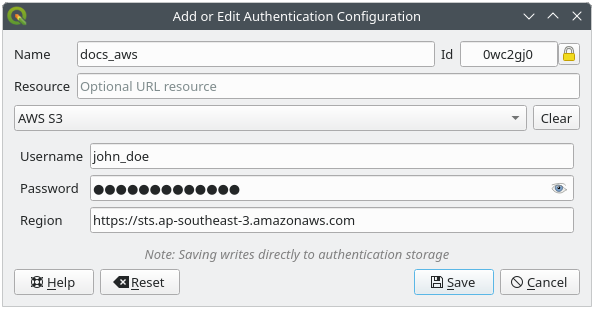
Abb. 21.10 AWS S3 authentication configs
21.1.5.3. Basic Authentication
The Basic authentication method is used for services that require standard HTTP authentication with a Username, Password and Realm.
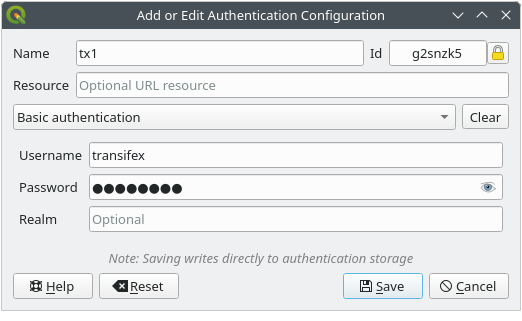
Abb. 21.11 Einfache HTTP Authentifikationskonfiguration
21.1.5.4. ESRI Token Authentication
The ESRI token authentication method is used for ArcGIS REST Servers that require token-based authentication.
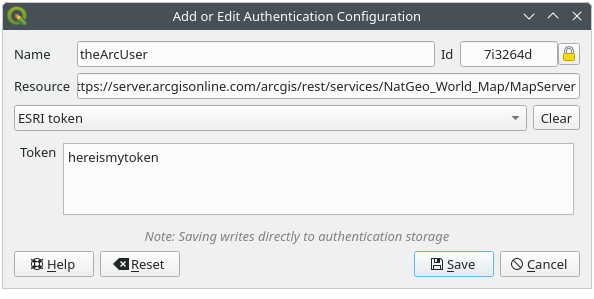
Abb. 21.12 Konfigurationen für die ESRI-Token-Authentifizierung
21.1.5.5. Identity certificate authentication
The Identity certificate authentication method allows you to connect using a client identity certificate.
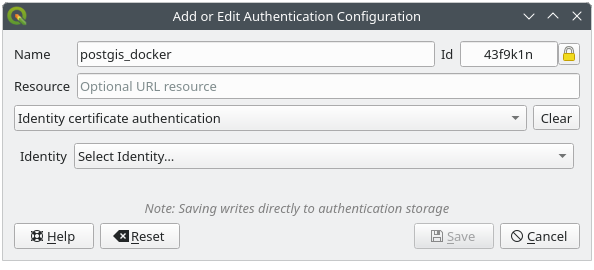
Abb. 21.13 Identity-cert authentication configs
21.1.5.6. MapTiler HMAC-SHA256 Authentication
The MapTiler HMAC-SHA256 authentication method is used to connect to MapTiler services that require HMAC-SHA256 authorization.
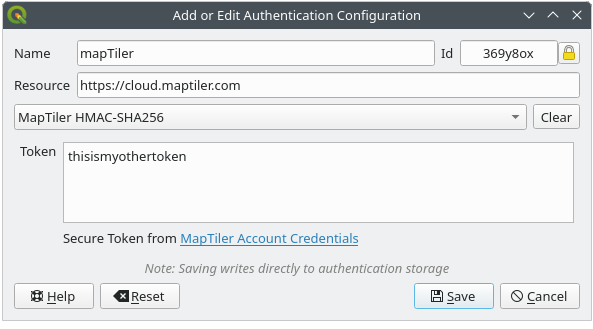
Abb. 21.14 MapTiler HmacSha256 authentication configs
21.1.5.7. OAuth2 Authentication
The OAuth2 authentication method is used to connect to services that require OAuth2 2.0 authorization, allowing secure access using client credential and token-based authentication.
It supports using localhost as the redirect host,
providing compatibility with services that do not accept http://127.0.0.1 redirects (for example, Microsoft SharePoint).
An advanced OAuth2 configuration option, Extra token header(s), allows attaching additional tokens returned by the OAuth2 token endpoint as HTTP(S) request headers.
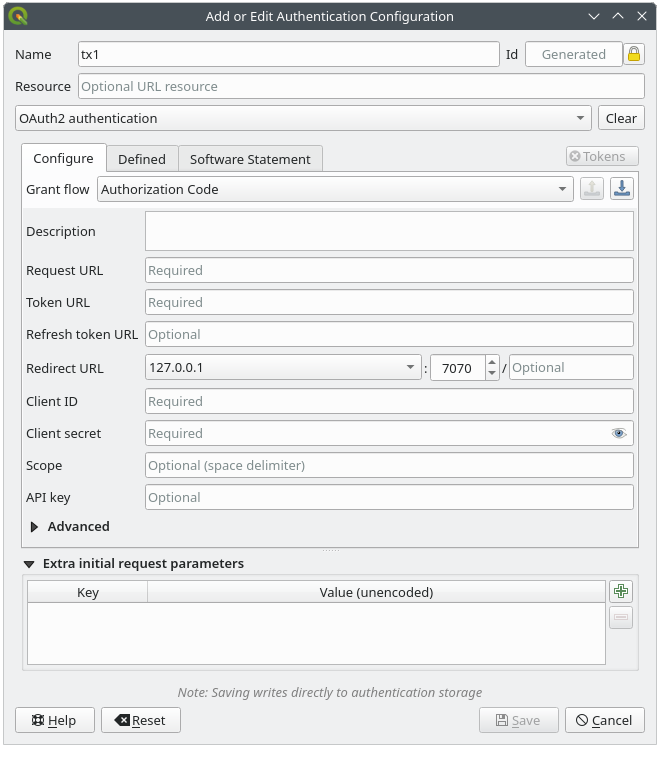
Abb. 21.15 OAuth2-Authentifizierungskonfigurationen
21.1.5.8. PKI-Paths Authentication
The PKI-Paths authentication method allows you to connect using separate certificate and key files stored on your system.
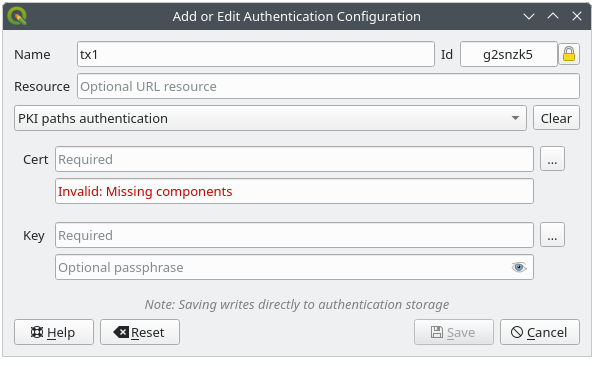
Abb. 21.16 PKI Pfad-Authentifikationskonfiguration
21.1.5.9. PKI-PKCS#12 Authentication
The PKI-PKCS#12 authentication method allows you to connect using a single bundle file containing both the certificate and private key, with an optional passphrase for the key.
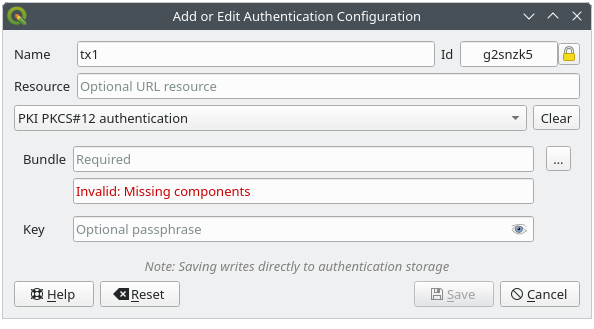
Abb. 21.17 PKI PKCS#12 Dateipfad Authentifikationskonfiguration
21.1.6. Hauptpasswort und Auth Konfig Hilfsmittel
Unter dem Optionen-Menü () in der Authentifikation Registerkarte gibt es verschiedene Werkzeuge die Authentifikationsdatenbank und -konfigurationen zu verwalten:
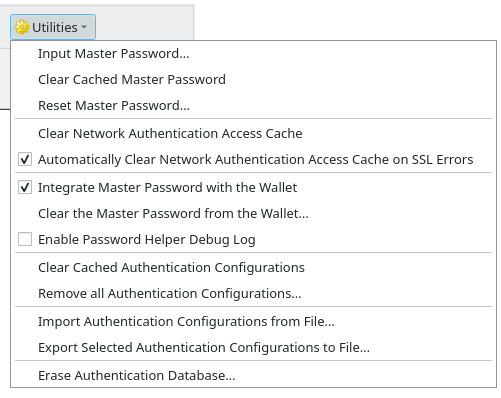
Abb. 21.18 Werkzeug-Menü
Input master password…: opens the master password input dialog, independent of performing any authentication database command
Clear cached master password: unsets the master password if it has been set
Reset master password…: opens a dialog to change the master password (the current password must be known) and optionally back up the current database
Clear network authentication access cache: clears the authentication cache of all connections
Automatically clear network authentication access cache on SSL errors: the connection cache stores all authentication data for connections, also when the connection fails. If you change authentication configurations or certification authorities, you should clear the authentication cache or restart QGIS. When this option is checked, the authentication cache will be automatically cleared every time an SSL error occurs and you choose to abort the connection
Integrate master password with the Wallet: adds the master password to your personal Wallet/Keyring
Clear the master password from the Wallet…: deletes the master password from your Wallet/Keyring
Enable password helper debug log: enables a debug tool that will contain all the log information of the authentication methods
Clear cached authentication configurations: clears the internal lookup cache for configurations, used to speed up network connections. This does not clear QGIS’s core network access manager’s cache, which requires a relaunch of QGIS.
Remove all authentication configurations…: clears the database of all configuration records, without removing other stored records.
Import authentication configurations from file…: imports from an
.XMLfile details for creating custom authentication configurations.Export selected authentication configurations to file…: exports the selected items to a possibly encrypted
.XMLfile.Erase authentication database…: schedules a backup of the current database and complete rebuild of the database table structure. The actions are scheduled for a later time, to ensure that other operations, like project loading, do not interrupt the operation or cause errors due to a temporarily missing database.
21.1.7. Gebrauche Authentifikationskonfiguration
Typischerweise wird eine Authentifizierungskonfiguration in einem Konfigurationsdialog für ein Netzwerk-Dienste (wie WMS) ausgewählt. Allerdings kann das Auswahl-Widget überall, wo Authentifizierung benötigt wird, eingebettet werden oder in einer Nicht-Kernfunktionalität, wie in Dritt-Beteiligten PyQGIS oder C ++ Plugins.
When using the selector, No authentication is displayed in the
pop-up menu control when nothing is selected, when there are no configurations
to choose from, or when a previously assigned configuration can no longer be
found in the database. Use the drop-down menu to select an existing authentication
configuration or press Create a new authentication configuration
to create a configuration you could use.
More details at Authentifizierung.
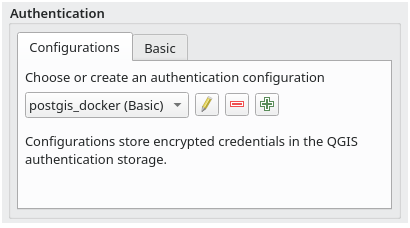
Abb. 21.19 Authentifizierungskonfigurations-Selektor mit ausgewählter Konfiguration
21.1.8. Python-Bindung
All classes and public functions have sip bindings, except QgsAuthCrypto, since management of the master password hashing and auth database encryption should be handled by the main app, and not via Python.
Sobald das Master-Passwort eingegeben wurde, ist die API für den Zugriff auf die Authentifizierungs-Konfigurationen in der Authentifizierungsdatenbank geöffnet, ähnlich wie Firefox funktioniert. Es wurde jedoch keine Mauer gegen den PyQGIS-Zugriff definiert. Dies kann zu Problemen führen, bei denen ein Benutzer ein bösartiges PyQGIS-Plugin herunterlädt/installiert oder eine eigenständige App nutzt, die Zugriff auf Authentifizierungsdaten erhält.