Wichtig
Übersetzen ist eine Gemeinschaftsleistung Sie können mitmachen. Diese Seite ist aktuell zu 66.91% übersetzt.
24.1.2. Kartografie
24.1.2.1. Punkte an Objekten ausrichten
Berechnet die erforderliche Drehung, um Punktelemente mit dem nächstgelegenen Objekt aus einem anderen Referenz-Layer auszurichten. Der Ausgabe-Layer wird um ein neues Feld erweitert, das den Winkel (in Grad, im Uhrzeigersinn) zum nächstgelegenen Referenzobjekt enthält.
Optional kann die Symbologie des Ausgabe-Layers so eingestellt werden, dass sie automatisch das berechnete Rotationsfeld verwendet, um Punktsymbole zu drehen. Bei Bedarf kann ein maximaler Abstand für die Punkte festgelegt werden, um zu vermeiden, dass isoliert liegende Punkte an weit entfernten Objekten ausgerichtet werden.
Hinweis
Dieser Algorithmus ist für Anwendungsfälle wie die Ausrichtung von Gebäudepunktsymbolen auf die nächstgelegene Straßenrichtung konzipiert.
 Erlaubt auch die Insitu-Bearbeitung von Punkt-Objekten
Parameter
Bezeichnung |
Name |
Typ |
Beschreibung |
|---|---|---|---|
Eingabelayer |
|
[Vektor: Punkt] |
Punkt-Objekte, für die die Drehung berechnet werden soll |
Referenz-Layer |
|
[Vektor: Geometrie] |
Layer mit den Objekten, aus denen die Rotation berechnet werden soll |
Maximal zu berücksichtigende Entfernung Optional |
|
[numerisch: Double] Standard: Nicht gesetzt |
Wenn innerhalb dieser Entfernung kein Referenz-Objekt gefunden wird, wird dem Punkt keine Drehung zugewiesen. |
Winkel-Feldname |
|
[Text] Standard: ‚rotation‘ |
Feld, in dem der Rotationswert gespeichert wird. |
Symbologie automatisch zuweisen |
|
[Boolean] Standard: True |
Dreht die Symbolmarkierung der Objekte anhand des ermittelten Winkelwerts. |
Ausgerichteter Layer |
|
[Vektor: Punkt] Standard: |
Legen Sie fest, wie der Ausgabe-Layer gespeichert werden soll. Mögliche Optionen sind:
Die Kodierung der Datei kann ebenfalls hier geändert werden. |
Ausgaben
Bezeichnung |
Name |
Typ |
Beschreibung |
|---|---|---|---|
Ausgerichteter Layer |
|
[Vektor: Punkt] |
Der neue Punkt-Layer mit einem Rotationsfeld. Wenn der Layer direkt in QGIS geladen wird, wird standardmäßig die Symbologie des Eingabe-Layers angewendet, mit einer datendefinierten Drehung für die Punktdarstellung. |
Pythoncode
Algorithm-Kennung: native:angletonearest
import processing
processing.run("algorithm_id", {parameter_dictionary})
Die Algorithmus-Kennung wird angezeigt, wenn Sie den Mauszeiger über den Algorithmus in der Verarbeitungs-Werkzeugkiste bewegen. Die Parameter-Liste (parameter_dictionary) enthält die Namen und Werte der Parameter. Siehe Verarbeitungs-Algorithmen von der Konsole aus verwenden für Details zur Ausführung von Verarbeitungs-Algorithmen über die Python-Konsole.
24.1.2.2. Stildatenbanken kombinieren
Kombiniert mehrere QGIS-Stildatenbanken zu einer einzigen Stildatenbank. Wenn Elemente desselben Typs mit demselben Namen in verschiedenen Quelldatenbanken vorhanden sind, werden diese umbenannt, damit sie in der kombinierten Ausgabedatenbank eindeutige Namen haben.
Siehe auch
Parameter
Bezeichnung |
Name |
Typ |
Beschreibung |
|---|---|---|---|
Eingabe-Datenbanken |
|
[Datei] [Liste] |
Dateien, die QGIS-Stilelemente enthalten |
Zu kombinierende Objekte |
|
[Aufzählung] [Liste] |
Arten von Stilelementen in den Eingabedatenbanken, die Sie in die neue Datenbank übernehmen möchten. Dies können sein:
|
Ausgabe-Datenbank |
|
[Datei] Standard: |
Ausgabe:
|
Ausgaben
Bezeichnung |
Name |
Typ |
Beschreibung |
|---|---|---|---|
Anzahl der Farbverläufe |
|
[numerisch: Ganzzahl] |
|
Anzahl der Beschriftungseinstellungen |
|
[numerisch: Ganzzahl] |
|
Ausgabe-Datenbank |
|
[Datei] |
Ausgabe |
Anzahl der Symbole |
|
[numerisch: Ganzzahl] |
|
Anzahl der Textformate |
|
[numerisch: Ganzzahl] |
Pythoncode
Algorithm-Kennung: native:combinestyles
import processing
processing.run("algorithm_id", {parameter_dictionary})
Die Algorithmus-Kennung wird angezeigt, wenn Sie den Mauszeiger über den Algorithmus in der Verarbeitungs-Werkzeugkiste bewegen. Die Parameter-Liste (parameter_dictionary) enthält die Namen und Werte der Parameter. Siehe Verarbeitungs-Algorithmen von der Konsole aus verwenden für Details zur Ausführung von Verarbeitungs-Algorithmen über die Python-Konsole.
24.1.2.3. Create categorized renderer from styles
Sets a vector layer’s renderer to a categorized renderer using matching symbols from a style database. If no style file is specified, symbols from the user’s current symbol library are used instead.
A specified expression or field is used to create categories for the renderer. Each category is individually matched to the symbols which exist within the specified QGIS XML style database. Whenever a matching symbol name is found, the category’s symbol will be set to this matched symbol.
If desired, outputs can also be tables containing lists of the categories which could not be matched to symbols, and symbols which were not matched to categories.
Parameter
Bezeichnung |
Name |
Typ |
Beschreibung |
|---|---|---|---|
Eingabelayer |
|
[Vektor: alle] |
Vector layer to apply a categorized style to |
Categorize using expression |
|
[Ausdruck] |
Field or expression to categorize the features |
Style database (leave blank to use saved symbols) |
|
[Datei] |
File ( |
Use case-sensitive match to symbol names |
|
[Boolean] Standard: falsch |
If True (checked), applies a case sensitive comparison between the categories and symbols names |
Ignore non-alphanumeric characters while matching |
|
[Boolean] Standard: falsch |
If True (checked), non-alphanumeric characters in the categories and symbols names will be ignored, allowing greater tolerance during the match. |
Non-matching categories Optional |
|
[vector: table] Standard: |
Output table for categories which do not match any symbol in the database. One of:
Die Kodierung der Datei kann ebenfalls hier geändert werden. |
Non-matching symbol names Optional |
|
[vector: table] Standard: |
Output table for symbols from the provided style database which do not match any category. One of:
Die Kodierung der Datei kann ebenfalls hier geändert werden. |
Ausgaben
Bezeichnung |
Name |
Typ |
Beschreibung |
|---|---|---|---|
Non-matching categories |
|
[vector: table] |
Lists categories which could not be matched to any symbol in the provided style database |
Non-matching symbol names |
|
[vector: table] |
Lists symbols from the provided style database which could not match any category |
Categorized layer |
|
[wie Eingabe] |
The input vector layer with the categorized style applied. No new layer is output. |
Pythoncode
Algorithm ID: native:categorizeusingstyle
import processing
processing.run("algorithm_id", {parameter_dictionary})
Die Algorithmus-Kennung wird angezeigt, wenn Sie den Mauszeiger über den Algorithmus in der Verarbeitungs-Werkzeugkiste bewegen. Die Parameter-Liste (parameter_dictionary) enthält die Namen und Werte der Parameter. Siehe Verarbeitungs-Algorithmen von der Konsole aus verwenden für Details zur Ausführung von Verarbeitungs-Algorithmen über die Python-Konsole.
24.1.2.4. Create style database from project
Extracts all style objects (symbols, color ramps, text formats and label settings) from a QGIS project.
The extracted symbols are saved to a QGIS style database (XML format),
which can be managed and imported via the Style Manager
dialog.
Siehe auch
Parameter
Bezeichnung |
Name |
Typ |
Beschreibung |
|---|---|---|---|
Input project (leave blank to use current) Optional |
|
[Datei] |
A QGIS project file to extract the style items from |
Objects to extract |
|
[Aufzählung] [Liste] |
Types of style items in the input project you would like to put in the new database. These can be:
|
Ausgabe-Datenbank |
|
[Datei] Standard: |
Specify the output
|
Ausgaben
Bezeichnung |
Name |
Typ |
Beschreibung |
|---|---|---|---|
Anzahl der Farbverläufe |
|
[numerisch: Ganzzahl] |
Number of color ramps |
Anzahl der Beschriftungseinstellungen |
|
[numerisch: Ganzzahl] |
Number of label settings |
Ausgabe-Datenbank |
|
[Datei] |
Output |
Anzahl der Symbole |
|
[numerisch: Ganzzahl] |
Number of symbols |
Anzahl der Textformate |
|
[numerisch: Ganzzahl] |
Number of text formats |
Pythoncode
Algorithm ID: native:stylefromproject
import processing
processing.run("algorithm_id", {parameter_dictionary})
Die Algorithmus-Kennung wird angezeigt, wenn Sie den Mauszeiger über den Algorithmus in der Verarbeitungs-Werkzeugkiste bewegen. Die Parameter-Liste (parameter_dictionary) enthält die Namen und Werte der Parameter. Siehe Verarbeitungs-Algorithmen von der Konsole aus verwenden für Details zur Ausführung von Verarbeitungs-Algorithmen über die Python-Konsole.
24.1.2.5. Export atlas layout as image
Exports the atlas of a print layout as image files (e.g. PNG or JPEG images).
If a coverage layer is set, the selected layout’s atlas settings exposed in this algorithm will be overwritten. In this case, an empty filter or sort by expression will turn those settings off.
Parameter
Grundlegende Parameter
Bezeichnung |
Name |
Typ |
Beschreibung |
|---|---|---|---|
Atlas layout |
|
[layout] |
Layout to export |
Coverage layer Optional |
|
[Vektor: Geometrie] |
Layer to use to generate the atlas |
Filterausdruck |
|
[Ausdruck] |
Expression to use to filter out atlas features |
Sort expression Optional |
|
[Ausdruck] |
Expression to use to sort the atlas features |
Reverse sort order |
|
[Boolean] Standard: falsch |
Determines if sorting should be inverted. Used when a sort expression is provided. |
Output filename expression |
|
[Ausdruck] Default: ‚output_‘||@atlas_featurenumber |
Expression for use to generate filenames |
Output folder |
|
[Verzeichnis] |
Destination folder where the images will be generated |
Fortgeschrittene Parameter
Bezeichnung |
Name |
Typ |
Beschreibung |
|---|---|---|---|
Map layers to assign to unlocked map item(s) Optional |
|
[enumeration] [layer] |
Layers to display in the map item(s) whose contents are not locked |
Image format |
|
[Aufzählung] Default: png |
File format of the generated output(s). The list of available formats varies depending on OS and installed drivers. |
DPI Optional |
Standard: Nicht gesetzt |
[numerisch: Double] |
DPI of the output file(s). If not set, the value in the print layout settings will be used. |
Generate world file |
|
[Boolean] Standard: True |
Determines if a world file should be generated |
Export RDF metadata |
|
[Boolean] Standard: True |
Determines if RDF metadata (title, author, …) should be generated |
Enable antialiasing |
|
[Boolean] Standard: True |
Determines if antialiasing should be enabled |
Ausgaben
Bezeichnung |
Name |
Typ |
Beschreibung |
|---|---|---|---|
Image file |
|
[Datei] |
Image files generated by the atlas layout |
Pythoncode
Algorithm ID: native:atlaslayouttoimage
import processing
processing.run("algorithm_id", {parameter_dictionary})
Die Algorithmus-Kennung wird angezeigt, wenn Sie den Mauszeiger über den Algorithmus in der Verarbeitungs-Werkzeugkiste bewegen. Die Parameter-Liste (parameter_dictionary) enthält die Namen und Werte der Parameter. Siehe Verarbeitungs-Algorithmen von der Konsole aus verwenden für Details zur Ausführung von Verarbeitungs-Algorithmen über die Python-Konsole.
24.1.2.6. Export atlas layout as PDF (multiple files)
Exports the atlas of a print layout to multiple PDF files.
If a coverage layer is set, the selected layout’s atlas settings exposed in this algorithm will be overwritten. In this case, an empty filter or sort by expression will turn those settings off.
Parameter
Grundlegende Parameter
Bezeichnung |
Name |
Typ |
Beschreibung |
|---|---|---|---|
Atlas layout |
|
[layout] |
Layout to export |
Coverage layer Optional |
|
[Vektor: Geometrie] |
Layer to use to generate the atlas |
Filterausdruck |
|
[Ausdruck] |
Expression to use to filter out atlas features |
Sort expression Optional |
|
[Ausdruck] |
Expression to use to sort the atlas features |
Reverse sort order |
|
[Boolean] Standard: falsch |
Determines if sorting should be inverted. Used when a sort expression is provided. |
Output filename Optional |
|
[Ausdruck] |
Name pattern of the PDF output files. |
Output folder |
|
[Verzeichnis] |
Destination folder for the output PDF files. |
Fortgeschrittene Parameter
Bezeichnung |
Name |
Typ |
Beschreibung |
|---|---|---|---|
Map layers to assign to unlocked map item(s) Optional |
|
[enumeration] [layer] |
Layers to display in the map item(s) whose contents are not locked |
DPI Optional |
Standard: Nicht gesetzt |
[numerisch: Double] |
DPI of the output file(s). If not set, the value in the print layout settings will be used. |
Always export as vectors |
|
[Boolean] Standard: falsch |
Determines if vectorial data should be left as vectors |
Always export as raster |
|
[Boolean] Standard: falsch |
Forces all the items in the map to be rasterized.
This parameter takes precedence over the |
Append georeference information |
|
[Boolean] Standard: True |
Determines if a world file should be generated |
Export RDF metadata |
|
[Boolean] Standard: True |
Determines if RDF metadata (title, author, …) should be generated |
Disable tiled raster layer exports |
|
[Boolean] Standard: falsch |
Determines if raster should be tiled |
Simplify geometries to reduce output file size |
|
[Boolean] Standard: True |
Determines if geometries should be simplified to reduce output file size |
Text export |
|
[Aufzählung] Standard: 0 |
Determines if text should be exported as path or text objects. Possible options are:
|
Image compression |
|
[Aufzählung] Standard: 0 |
Determines compression level of the image and how suitable the file could be for printing outputs or post-production in external applications. Possible options are:
|
Ausgaben
Bezeichnung |
Name |
Typ |
Beschreibung |
|---|---|---|---|
PDF file |
|
[Datei] |
PDF file corresponding to the exported atlas layout |
Pythoncode
Algorithm ID: native:atlaslayouttomultiplepdf
import processing
processing.run("algorithm_id", {parameter_dictionary})
Die Algorithmus-Kennung wird angezeigt, wenn Sie den Mauszeiger über den Algorithmus in der Verarbeitungs-Werkzeugkiste bewegen. Die Parameter-Liste (parameter_dictionary) enthält die Namen und Werte der Parameter. Siehe Verarbeitungs-Algorithmen von der Konsole aus verwenden für Details zur Ausführung von Verarbeitungs-Algorithmen über die Python-Konsole.
24.1.2.7. Export atlas layout as PDF (single file)
Exports the atlas of a print layout as a single PDF file.
If a coverage layer is set, the selected layout’s atlas settings exposed in this algorithm will be overwritten. In this case, an empty filter or sort by expression will turn those settings off.
Parameter
Grundlegende Parameter
Bezeichnung |
Name |
Typ |
Beschreibung |
|---|---|---|---|
Atlas layout |
|
[layout] |
Layout to export |
Coverage layer Optional |
|
[Vektor: Geometrie] |
Layer to use to generate the atlas |
Filterausdruck |
|
[Ausdruck] |
Expression to use to filter out atlas features |
Sort expression Optional |
|
[Ausdruck] |
Expression to use to sort the atlas features |
Reverse sort order |
|
[Boolean] Standard: falsch |
Determines if sorting should be inverted. Used when a sort expression is provided. |
PDF file |
|
[Datei] Default: [Save to temporary file] |
Name (including path) of the output file. One of:
|
Fortgeschrittene Parameter
Bezeichnung |
Name |
Typ |
Beschreibung |
|---|---|---|---|
Map layers to assign to unlocked map item(s) Optional |
|
[enumeration] [layer] |
Layers to display in the map item(s) whose contents are not locked |
DPI Optional |
Standard: Nicht gesetzt |
[numerisch: Double] |
DPI of the output file(s). If not set, the value in the print layout settings will be used. |
Always export as vectors |
|
[Boolean] Standard: falsch |
Determines if vectorial data should be left as vectors |
Always export as raster |
|
[Boolean] Standard: falsch |
Forces all the items in the map to be rasterized.
This parameter takes precedence over the |
Append georeference information |
|
[Boolean] Standard: True |
Determines if a world file should be generated |
Export RDF metadata |
|
[Boolean] Standard: True |
Determines if RDF metadata (title, author, …) should be generated |
Disable tiled raster layer exports |
|
[Boolean] Standard: falsch |
Determines if raster should be tiled |
Simplify geometries to reduce output file size |
|
[Boolean] Standard: True |
Determines if geometries should be simplified to reduce output file size |
Text export |
|
[Aufzählung] Standard: 0 |
Determines if text should be exported as path or text objects. Possible options are:
|
Image compression |
|
[Aufzählung] Standard: 0 |
Determines compression level of the image and how suitable the file could be for printing outputs or post-production in external applications. Possible options are:
|
Ausgaben
Bezeichnung |
Name |
Typ |
Beschreibung |
|---|---|---|---|
PDF file |
|
[Datei] |
PDF file corresponding to the exported atlas layout |
Pythoncode
Algorithm ID: native:atlaslayouttopdf
import processing
processing.run("algorithm_id", {parameter_dictionary})
Die Algorithmus-Kennung wird angezeigt, wenn Sie den Mauszeiger über den Algorithmus in der Verarbeitungs-Werkzeugkiste bewegen. Die Parameter-Liste (parameter_dictionary) enthält die Namen und Werte der Parameter. Siehe Verarbeitungs-Algorithmen von der Konsole aus verwenden für Details zur Ausführung von Verarbeitungs-Algorithmen über die Python-Konsole.
24.1.2.8. Export print layout as image
Exports a print layout as an image file (e.g. PNG or JPEG images)
Parameter
Grundlegende Parameter
Bezeichnung |
Name |
Typ |
Beschreibung |
|---|---|---|---|
Print layout |
|
[layout] |
Layout to export |
Image file |
|
[Datei] Default: [Save to temporary file] |
Name (including path) of the output file. One of:
|
Fortgeschrittene Parameter
Bezeichnung |
Name |
Typ |
Beschreibung |
|---|---|---|---|
Map layers to assign to unlocked map item(s) Optional |
|
[enumeration] [layer] |
Layers to display in the map item(s) whose contents are not locked |
DPI Optional |
Standard: Nicht gesetzt |
[numerisch: Double] |
DPI of the output file(s). If not set, the value in the print layout settings will be used. |
Generate world file |
|
[Boolean] Standard: True |
Determines if a world file should be generated |
Export RDF metadata |
|
[Boolean] Standard: True |
Determines if RDF metadata (title, author, …) should be generated |
Enable antialiasing |
|
[Boolean] Standard: True |
Determines if antialiasing should be enabled |
Ausgaben
Bezeichnung |
Name |
Typ |
Beschreibung |
|---|---|---|---|
Image file |
|
[Datei] |
Image file corresponding to the exported print layout |
Pythoncode
Algorithm ID: native:printlayouttoimage
import processing
processing.run("algorithm_id", {parameter_dictionary})
Die Algorithmus-Kennung wird angezeigt, wenn Sie den Mauszeiger über den Algorithmus in der Verarbeitungs-Werkzeugkiste bewegen. Die Parameter-Liste (parameter_dictionary) enthält die Namen und Werte der Parameter. Siehe Verarbeitungs-Algorithmen von der Konsole aus verwenden für Details zur Ausführung von Verarbeitungs-Algorithmen über die Python-Konsole.
24.1.2.9. Export print layout as PDF
Exports a print layout as a PDF file.
Parameter
Grundlegende Parameter
Bezeichnung |
Name |
Typ |
Beschreibung |
|---|---|---|---|
Print Layout |
|
[layout] |
Layout to export |
PDF file |
|
[Datei] Default: [Save to temporary file] |
Name (including path) of the output file. One of:
|
Fortgeschrittene Parameter
Bezeichnung |
Name |
Typ |
Beschreibung |
|---|---|---|---|
Map layers to assign to unlocked map item(s) Optional |
|
[enumeration] [layer] |
Layers to display in the map item(s) whose contents are not locked |
DPI Optional |
Standard: Nicht gesetzt |
[numerisch: Double] |
DPI of the output file(s). If not set, the value in the print layout settings will be used. |
Always export as vectors |
|
[Boolean] Standard: falsch |
Determines if vectorial data should be left as vectors |
Always export as raster |
|
[Boolean] Standard: falsch |
Forces all the items in the map to be rasterized.
This parameter takes precedence over the |
Append georeference information |
|
[Boolean] Standard: True |
Determines if a world file should be generated |
Export RDF metadata |
|
[Boolean] Standard: True |
Determines if RDF metadata (title, author, …) should be generated |
Disable tiled raster layer exports |
|
[Boolean] Standard: falsch |
Determines if raster should be tiled |
Simplify geometries to reduce output file size |
|
[Boolean] Standard: True |
Determines if geometries should be simplified to reduce output file size |
Text export |
|
[Aufzählung] Standard: 0 |
Determines if text should be exported as path or text objects. Possible options are:
|
Image compression |
|
[Aufzählung] Standard: 0 |
Determines compression level of the image and how suitable the file could be for printing outputs or post-production in external applications. Possible options are:
|
Export layers as separate PDF files |
|
[Boolean] Standard: falsch |
If True, then a separate PDF file will be created per layer per map item in the layout. Additionally, separate PDF files may be created for other complex layout items, resulting in a set of PDF files which contain logical atomic components of the layout. |
Ausgaben
Bezeichnung |
Name |
Typ |
Beschreibung |
|---|---|---|---|
PDF file |
|
[Datei] |
PDF file(s) corresponding to the exported print layout |
Pythoncode
Algorithm ID: native:printlayouttopdf
import processing
processing.run("algorithm_id", {parameter_dictionary})
Die Algorithmus-Kennung wird angezeigt, wenn Sie den Mauszeiger über den Algorithmus in der Verarbeitungs-Werkzeugkiste bewegen. Die Parameter-Liste (parameter_dictionary) enthält die Namen und Werte der Parameter. Siehe Verarbeitungs-Algorithmen von der Konsole aus verwenden für Details zur Ausführung von Verarbeitungs-Algorithmen über die Python-Konsole.
24.1.2.10. Extract labels
Extracts label information from a rendered map at a given extent and scale.
If a map theme is provided, the rendered map will match the visibility and symbology of that theme. If left blank, all visible layers from the project will be used. Extracted label information include: position (served as point geometries), the associated layer name and feature ID, label text, rotation (in degree, clockwise), multiline alignment, and font details.
Warnung
This algorithm drops existing primary keys or FID values and regenerates them in output layers.
Parameter
Grundlegende Parameter
Bezeichnung |
Name |
Typ |
Beschreibung |
|---|---|---|---|
Map extent |
|
[Ausdehnung] |
Extent of the map to extract the labels from Verfügbare Methoden sind:
|
Map scale |
|
[scale] |
Extracted labels will be rendered using their properties set at this scale. |
Map theme Optional |
|
[maptheme] |
A map theme displaying the layers to extract the labels from. If unset, labels of the currently visible layers are extracted. |
Include unplaced labels |
|
[Boolean] Standard: True |
Specify whether all overlapping labels should be extracted, including the conflicting (thus unplaced) ones. |
Extracted labels |
|
[Vektor: Punkt] Standard: |
Specify the output vector layer for the extent(s). One of:
Die Kodierung der Datei kann ebenfalls hier geändert werden. |
Fortgeschrittene Parameter
Bezeichnung |
Name |
Typ |
Beschreibung |
|---|---|---|---|
Map resolution (in DPI) Optional |
Default: 96.0 |
[numerisch: Double] |
Ausgaben
Bezeichnung |
Name |
Typ |
Beschreibung |
|---|---|---|---|
Extracted labels |
|
[Vektor: Punkt] |
Point vector layer representing the fetched labels. Each feature has attributes identifying its source (layer, feature ID) and the assigned labeling properties (text, font, size, rotation, …). A default style with labeling and null symbol is also applied to the layer. Warnung Because some of the generated fields have name with more than
10 characters, using the ESRI shapefile format ( |
Pythoncode
Algorithm ID: native:extractlabels
import processing
processing.run("algorithm_id", {parameter_dictionary})
Die Algorithmus-Kennung wird angezeigt, wenn Sie den Mauszeiger über den Algorithmus in der Verarbeitungs-Werkzeugkiste bewegen. Die Parameter-Liste (parameter_dictionary) enthält die Namen und Werte der Parameter. Siehe Verarbeitungs-Algorithmen von der Konsole aus verwenden für Details zur Ausführung von Verarbeitungs-Algorithmen über die Python-Konsole.
24.1.2.11. Print layout map extent to layer
Creates a polygon layer containing the extent of a print layout map item (or items), with attributes specifying the map size (in layout units, i.e. the reference map units), scale and rotation.
If the map item parameter is specified, then only the matching map extent will be exported. If it is not specified, all map extents from the layout will be exported.
Optionally, a specific output CRS can be specified. If it is not specified, the original map item CRS will be used.
Parameter
Grundlegende Parameter
Bezeichnung |
Name |
Typ |
Beschreibung |
|---|---|---|---|
Print layout |
|
[Aufzählung] |
A print layout in the current project |
Map item Optional |
|
[Aufzählung] Default: All the map items |
The map item(s) whose information you want to extract. If none is provided then all the map items are processed. |
Extent |
|
[Vektor: Polygon] Standard: |
Specify the output vector layer for the extent(s). One of:
Die Kodierung der Datei kann ebenfalls hier geändert werden. |
Fortgeschrittene Parameter
Bezeichnung |
Name |
Typ |
Beschreibung |
|---|---|---|---|
Overrride CRS Optional |
|
[KBS] Default: The layout CRS |
Select the CRS for the layer in which the information will be reported. |
Ausgaben
Bezeichnung |
Name |
Typ |
Beschreibung |
|---|---|---|---|
Map height |
|
[numerisch: Double] |
|
Extent |
|
[Vektor: Polygon] |
Output polygon vector layer containing extents of all the input layout map item(s) |
Map rotation |
|
[numerisch: Double] |
|
Map scale |
|
[numerisch: Double] |
|
Map width |
|
[numerisch: Double] |
Pythoncode
Algorithm ID: native:printlayoutmapextenttolayer
import processing
processing.run("algorithm_id", {parameter_dictionary})
Die Algorithmus-Kennung wird angezeigt, wenn Sie den Mauszeiger über den Algorithmus in der Verarbeitungs-Werkzeugkiste bewegen. Die Parameter-Liste (parameter_dictionary) enthält die Namen und Werte der Parameter. Siehe Verarbeitungs-Algorithmen von der Konsole aus verwenden für Details zur Ausführung von Verarbeitungs-Algorithmen über die Python-Konsole.
24.1.2.12. Set layer style
Applies a provided style to a layer. The style must be defined in a
QML file.
No new output are created: the style is immediately assigned to the layer.
Parameter
Bezeichnung |
Name |
Typ |
Beschreibung |
|---|---|---|---|
Input Layer |
|
[layer] |
Input layer you want to apply the style to |
Style file |
|
[Datei] |
Path to the |
Ausgaben
Bezeichnung |
Name |
Typ |
Beschreibung |
|---|---|---|---|
|
[wie Eingabe] |
The input layer with the new style assigned. No new layer is created. |
Pythoncode
Algorithm ID: native:setlayerstyle
import processing
processing.run("algorithm_id", {parameter_dictionary})
Die Algorithmus-Kennung wird angezeigt, wenn Sie den Mauszeiger über den Algorithmus in der Verarbeitungs-Werkzeugkiste bewegen. Die Parameter-Liste (parameter_dictionary) enthält die Namen und Werte der Parameter. Siehe Verarbeitungs-Algorithmen von der Konsole aus verwenden für Details zur Ausführung von Verarbeitungs-Algorithmen über die Python-Konsole.
24.1.2.13. Topological coloring
Assigns a color index to polygon features in such a way that no adjacent polygons share the same color index, whilst minimizing the number of colors required.
The algorithm allows choice of method to use when assigning colors.
A minimum number of colors can be specified if desired. The color index is saved to a new attribute named color_id.
The following example shows the algorithm with four different colors chosen; as you can see each color class has the same amount of features.
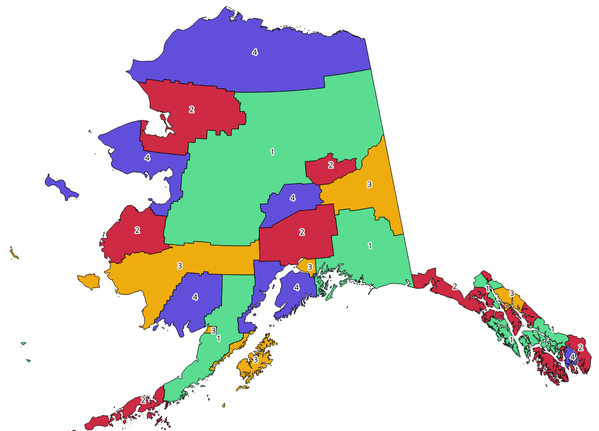
Abb. 24.1 Topological colors example
Parameter
Bezeichnung |
Name |
Typ |
Beschreibung |
|---|---|---|---|
Eingabelayer |
|
[Vektor: Polygon] |
The input polygon layer |
Minimum number of colors |
|
[numerisch: Ganzzahl] Default: 4 |
The minimum number of colors to assign. Minimum 1, maximum 1000. |
Minimum distance between features |
|
[numerisch: Double] Default: 0.0 |
Prevent nearby (but non-touching) features from being assigned equal colors. Minimum 0.0. |
Balance color assignment |
|
[Aufzählung] Standard: 0 |
Options are:
|
Colored |
|
[Vektor: Polygon] Standard: |
Specify the output layer. One of:
Die Kodierung der Datei kann ebenfalls hier geändert werden. |
Ausgaben
Bezeichnung |
Name |
Typ |
Beschreibung |
|---|---|---|---|
Colored |
|
[Vektor: Polygon] |
Polygon vector layer with an added |
Pythoncode
Algorithm ID: qgis:topologicalcoloring
import processing
processing.run("algorithm_id", {parameter_dictionary})
Die Algorithmus-Kennung wird angezeigt, wenn Sie den Mauszeiger über den Algorithmus in der Verarbeitungs-Werkzeugkiste bewegen. Die Parameter-Liste (parameter_dictionary) enthält die Namen und Werte der Parameter. Siehe Verarbeitungs-Algorithmen von der Konsole aus verwenden für Details zur Ausführung von Verarbeitungs-Algorithmen über die Python-Konsole.
24.1.2.14. Transfer annotations from main layer
Transfers all annotations from the main annotation layer in a project to a new annotation layer. Items placement can then be adjusted within the layer stack.
Parameter
Bezeichnung |
Name |
Typ |
Beschreibung |
|---|---|---|---|
New layer name |
|
[Text] Default: ‚Annotations‘ |
Name of the annotations layer to create |
Ausgaben
Bezeichnung |
Name |
Typ |
Beschreibung |
|---|---|---|---|
New layer name |
|
[layer] |
A layer with items from the main annotation layer |
Pythoncode
Algorithm ID: native:transferannotationsfrommain
import processing
processing.run("algorithm_id", {parameter_dictionary})
Die Algorithmus-Kennung wird angezeigt, wenn Sie den Mauszeiger über den Algorithmus in der Verarbeitungs-Werkzeugkiste bewegen. Die Parameter-Liste (parameter_dictionary) enthält die Namen und Werte der Parameter. Siehe Verarbeitungs-Algorithmen von der Konsole aus verwenden für Details zur Ausführung von Verarbeitungs-Algorithmen über die Python-Konsole.